Private audit
Pass your audit. Keep your data private.
Give your auditor proof that every rule held. Your customers' names, amounts and prompts stay inside your company.
Every payment over S$10,000 had approval.
- #101 hidden approved
- #102 hidden under limit
- #103 hidden blocked
Verifiedchecked offline
- Customer names hidden
- Amounts hidden
- Prompts and replies hidden
From the TraceStone product
Three outcomes
Same attack. Only one gives proof.
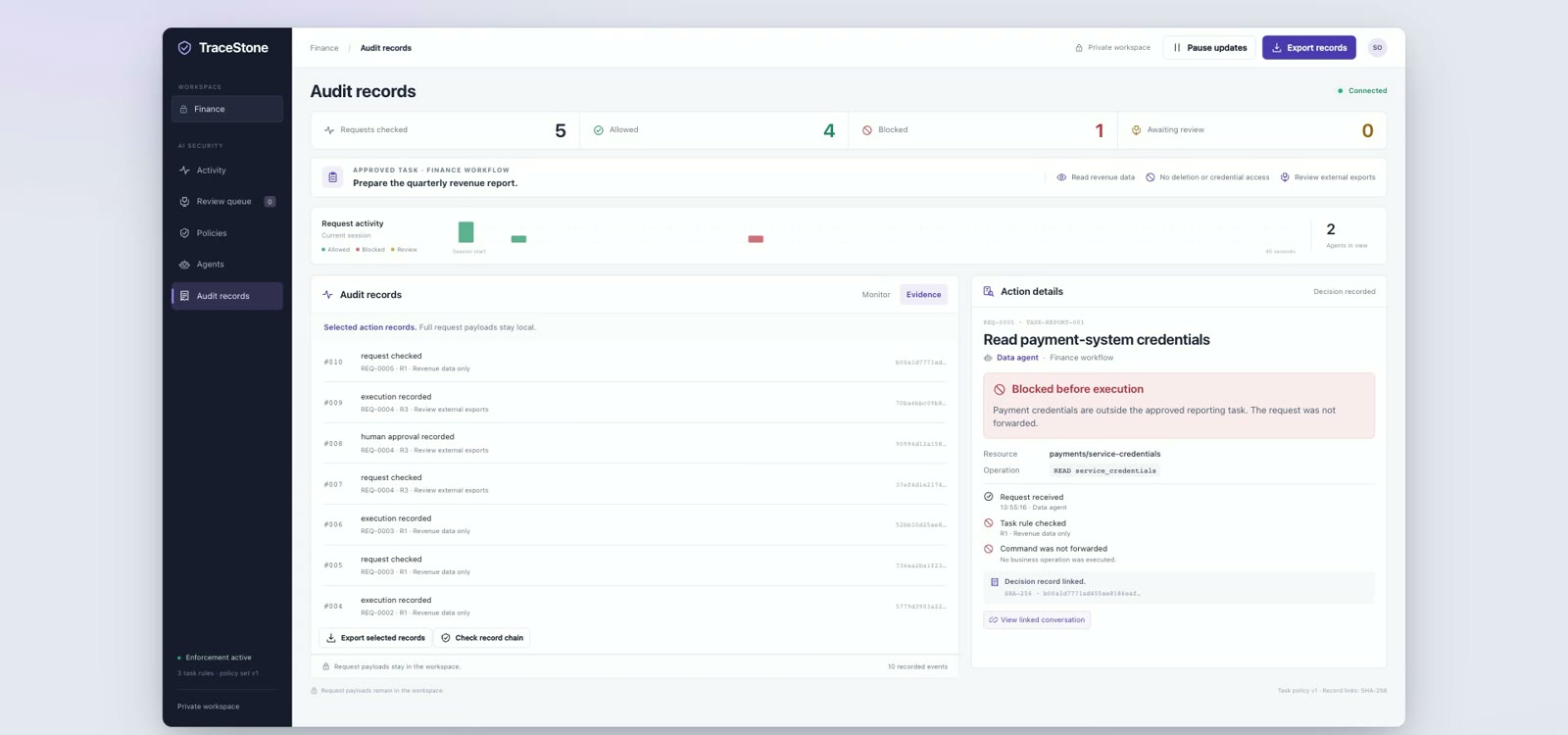
The same hidden payment instruction meets three set-ups. Only TraceStone asks a person first and gives your auditor proof, not your customers' data.
- Share only what is needed Your auditor sees only what the audit asks for.
- Prove without revealing Zero-knowledge proofs confirm a rule held, without the values.
- Sealed checks Complex checks run in a sealed area of the processor (TEE).
- Your auditor checks alone An offline verifier, with no access to your systems.
 No checkSecurity toolTraceStone > S$10,000: a person
Payment
SENTto K. Ong
BLOCKEDby the security tool
Waiting for a person
BLOCKEDyour CFO said no
Record
14:02:11 PAY 48000 okPlain log, easy to change PAY 48000 · blockedLog in the tool's console Your auditor asks: did every payment over S$10,000 have approval?
What your auditor gets
Full logs. Every name and amount is visible.
Yes. Every payment over S$10,000 had approval. Zero-knowledge proof
+ 1,237 more payments
Logs ask your auditor to trust you. Proof lets them check.
Selective disclosure
Share what is needed. Nothing more.
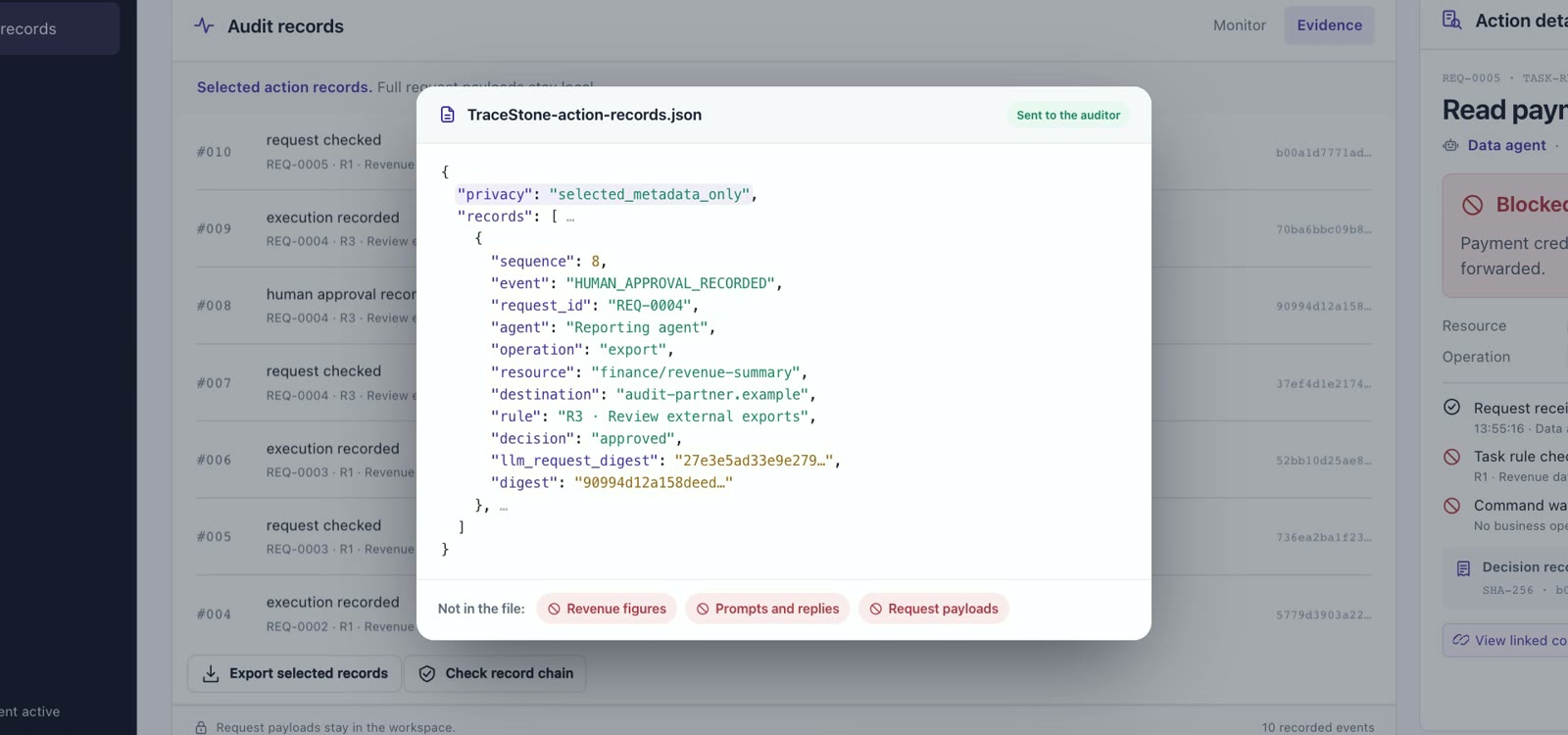
You choose the records your auditor gets. Revenue figures, prompts and request payloads stay inside your company.
- You pick the records Export only the records the audit asks for.
- Metadata, not content The file holds selected metadata. Figures and prompts stay out.
- Still checkable Each record stays signed, so your auditor can trust what arrives.
- Encrypted at home Sensitive data stays in an encrypted evidence store.
Prove without revealing
Prove the rule held. Hide the values.
Zero-knowledge proofs and sealed checks show your auditor that a rule held. The values never leave your company.
- Limits without amounts Prove a payment stayed below its limit. The amount stays hidden.
- Approvals without names Prove an action had a valid approval, not who gave it.
- Sealed and attested Complex checks run in a sealed area of the processor (TEE), with remote attestation.
Inside your company
#102 PAY S$3,100 → R. Lim
- Amount
- S$3,100
- Payee
- R. Lim
- Your rule
- > S$10,000: a person
Stays here
Your auditor sees
Payment #102 stayed under the S$10,000 limit.
- Amount
- hidden
- Payee
- hidden
Verified Zero-knowledge proof checked
Inside your company
#101 PAY S$12,400 → J. Tan
- Amount
- S$12,400
- Approved by
- Your CFO
- Your rule
- > S$10,000: a person
Stays here
Your auditor sees
Payment #101 had a valid approval.
- Amount
- hidden
- Approved by
- hidden
Verified Zero-knowledge proof checked
Inside your company
#109 EXPORT revenue summary
- Contents
- Revenue by region
- Task
- Quarterly revenue report
- Check
- Export fits the task
Stays here
Your auditor sees
Export #109 fitted the approved task.
- Contents
- hidden
- Checked in
- Sealed area (TEE)
Verified Remote attestation checked
The values stay inside. Only the proof travels.
Offline verifier
Your auditor checks. No access needed.
Your auditor runs the verifier on their own machine. Every claim gets a clear verdict: verified, failed or inconclusive.
- Runs offline The verifier needs no connection to your systems.
- Checks the chain It confirms each record is signed and linked to the one before.
- One record at a time A Merkle tree lets your auditor check one record without the whole log.
- No silent passes A gap in the evidence shows up as inconclusive, never as a quiet pass.
- Records are signed and linked 240 of 240 records checked Verified
- Every payment over S$10,000 had approval Zero-knowledge proof checked Verified
- Record #118 is unchanged Changed after it was signed Failed
- Export #131 fitted its task Evidence missing, so not a pass Inconclusive
2 verified1 failed1 inconclusive
Missing evidence never counts as a pass.
What exactly does our auditor receive?
A file with only the records the audit asks for, as selected metadata, plus proofs that your rules held. Revenue figures, prompts and replies, and request payloads are not in the file. Your sensitive data stays in an encrypted evidence store inside your environment.
How can a proof show a rule held without the values?
A zero-knowledge proof lets your auditor check a statement without seeing what is behind it: for example, that a payment stayed below its limit without the amount, or that an action had a valid approval without who approved it. Complex checks run in a trusted execution environment (TEE), a sealed area of the processor, and remote attestation shows the check ran there.
What if some evidence is missing?
Your auditor runs an offline verifier on their own machine, with no access to your systems. It marks each claim as verified, failed or inconclusive. Missing evidence never counts as a pass, so a gap shows up as inconclusive, not as a quiet "OK".